


In 2025, Lindy AI has positioned itself as a modern automation platform powered by intelligent agents that help teams streamline workflows, complete tasks, and reduce manual work. It allows users to create assistants that can research, analyze information, and take action across different tools.
As interest in AI automation grows, more companies are exploring how Lindy AI can support productivity, operations, and customer-facing processes. As automation adoption increases, businesses with stricter performance and security requirements often evaluate infrastructure options such as dedicated hosting to maintain full control over their systems.
At the same time, many businesses are also looking for Lindy AI alternatives due to pricing, scalability needs, integration limits, or a desire for more specialized automation—particularly in areas like outbound sales, multi-channel outreach, and SDR automation.
In this guide, you’ll learn how Lindy AI works, what it does well, where users often experience limitations, and how its pricing and feature set compare with other tools in the market. We also highlight the top Lindy AI competitors, their key features, pros and cons, pricing structures, and ideal use cases.
What is Lindy AI and how does it function?
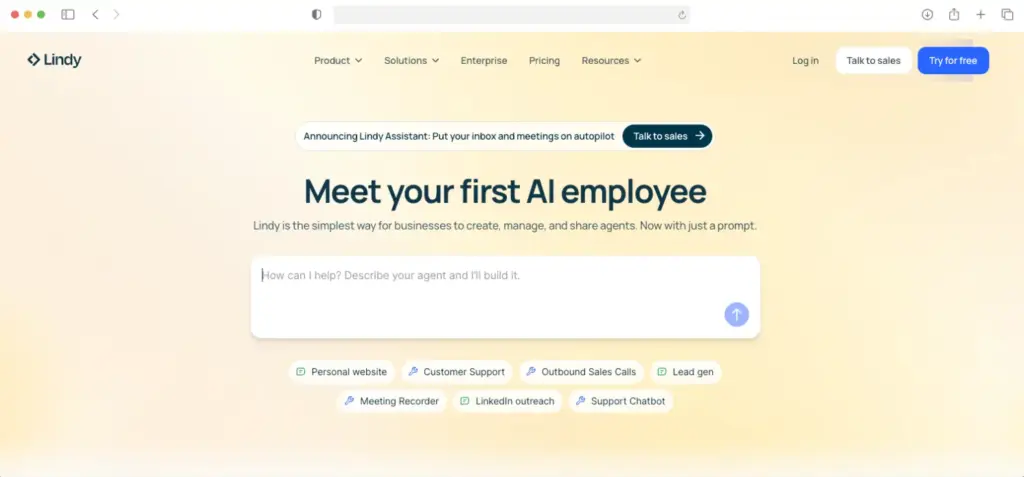
Lindy AI is an AI automation platform or agent builder that allows users to build intelligent agents without the need for coding. These AI assistants are capable of performing tasks across various business functions like support, sales, marketing, operations, and recruitment.
Pricing considerations for Lindy AI
Lindy AI’s pricing varies depending on the number of team members who will use the platform and other business needs such as number of phone calls, integrations, and size of character knowledge base.
There’s a free plan too that comes with 400 credits per month, 40 tasks, 1M character knowledge base, and over 100 integrations.
Overview of Lindy AI’s key features and capabilities
Lindy AI includes several core capabilities designed to help teams reduce manual work:
- No-code AI and automation: Lindy uses simple workflows to help users build their AI agents.
- AI Template Hub: Lindy offers various templates according to role and use case, which users can simply duplicate to use for their own business. These templates range from web scraping, to document processing, to verifying emails, detecting upsell opportunities, and so on.
- Lindy Academy: A hub where users can learn how to build their own AI agents.
- Capable of working across different business functions: Build AI agents who are experts at core business tasks like email management, handling inbound or outbound calls for support and sales, meeting assistance, and even data and research.
- Vast library of integrations: Works with a multiple integrations so users can seamlessly merge Lindy into their tech stack
- Lindy Build: A very simple way to build apps by just writing a description of what you need
Why do users explore options beyond Lindy AI?
Interestingly, Lindy AI has mixed reviews and ratings:
- G2: 4.9/5
- Trustpilot: 2.8/5
- Capterra: 3.5/5
Some of the constructive reviews include:
- “The learning curve for truly complex flows can be steep at first. Creating a simple automation is quick, but when you start adding multiple conditions, branches, and integrations with different APIs, it takes planning and some trial and error to get the logic right.”
- “The price, while justified by the ROI, can become a limiting factor for small teams as you need more Lindies or monthly tasks.”
- “After deleting my account, I was still charged $34.99 – which should never happen if a system properly removes payment information and personal data.”
- “I clicked on a button in an email they sent me, and was immediately charged without any clear warning or confirmation step. This felt like a deceptive practice.When I realized what happened and requested a refund, they refused to process it.”
- “It’s a good idea but the execution is poor and the absence of customer support is just unacceptable.”
Limitations of Lindy AI
To summarize, users often mention constraints such as:
- Difficulty scaling complex workflows
- Limited depth in outbound sales or SDR automation
- Higher pricing as usage increases
- Occasional reliability or performance issues
- Lack of specialized AI functionality and depth
- Challenges in integrating with specific CRMs or niche tools
- Security issues and privacy concerns
- Mediocre customer support
These limitations drive users to evaluate other platforms that offer features more suited to their business needs.
The 5 best Lindy AI alternatives to consider
1. AnyBiz.io (Best for B2B companies seeking a specialized AI-powered sales engagement and lead generation platform)

AnyBiz.io is a purpose‑built AI sales automation platform designed to help businesses scale their outbound outreach efforts and workflows. Unlike Lindy AI which gives you the tools to create your custom AI agents to assist you in sales, AnyBiz is ready to go and its AI SDR agents are tested and proven sales experts. They focus on helping teams find leads, personalize outreach at scale, and maintain consistent follow‑up across multiple channels—not just email. This makes it a strong choice for companies aiming to boost pipeline generation without expanding SDR headcount.
Key features:
- AI‑driven outreach across email, LinkedIn, phone calls, and landing pages
- Intelligent lead research and contact enrichment
- Pre‑built SDR automation sequences and templates
- Automated follow‑ups based on engagement triggers
- Includes email deliverability protection and inbox warmup tools
- Real‑time analytics and performance dashboards
Pros
- Strong focus on sales and outbound workflows
- Multi‑channel sequencing and personalization
- Built‑in lead research saves manual effort
- Flexible templates and customizable automation flows
Cons
- Focused on sales and outreach, and might not serve teams who are seeking more general automation outside of sales
2. Make (Best for complex, multi-step workflows and automation)

Make is a no-code AI automation tool that enables teams to automate workflows by connecting various apps through a visual builder. It also enables advanced features so it is suitable for businesses with complex workflows requiring automation across multiple platforms.
Key features
- Visual scenario builder: Drag-and-drop functionality lets users build multi-step workflows that connect apps and automate tasks.
- Advanced logic tools: Includes routers for branching workflows and filters for conditions
- Create AI Agents and AI tools: Develop these easily with no code required
- Enterprise security: Compliance with GDPR and SOC 2, single sign-on support for enterprise needs
Pros
- Complex branching and multi-step workflows and conditions available
- Credit-based pricing model can be more economical than task-based models
- Offers a large library of integrations across CRMs, email platforms, databases, and more, ensuring users can connect their entire tech stack.
Cons
- Learning curve due to its complexity in setting up workflows with branching, logic, and data handling
- Mixed reviews on support responsiveness and the clarity of error messages
- Credit-based pricing model can be confusing, especially for teams trying to estimate costs for multi-step workflows.
3. Zapier (Best for simple, user-friendly automation with quick setup)

Zapier is a no-code platform that simplifies automation for users, even those with minimal technical expertise. Known for its ease of use, Zapier allows businesses to automate workflows by connecting thousands of apps and services across the digital world. With its new AI-powered features, such as its prompt-based builder and AI Copilot, users can quickly set up automation tasks without diving into complex triggers or logic.
Key features:
- AI-powered Zap Builder: By typing a simple prompt, Zapier helps users auto-generate the steps needed.
- AI Copilot: Real-time assistance while building Zaps, offering suggestions and error explanations. It even creates visual diagrams before you commit to building any one system.
- Simple workflow setup: User-friendly interface for connecting apps, creating tasks, and automating routine processes.
- Chatbots and agents: AI-driven chatbots for responding to FAQs, and agents that handle complex tasks like preparing sales briefs.
- Wide integrations: Connects over 7,000 apps including CRMs, email platforms, and project management tools.
Pros
- User-friendly: Great for non-technical users who need quick, easy automation with minimal setup.
- Rapid setup: Automation tasks can be set up in minutes which saves time on recurring processes.
- Extensive integrations: Wide array of supported apps means you can connect almost any tool in your workflow without additional development.
Cons
- Limited complexity: Struggles with workflows requiring complex branching, logic, or advanced error handling.
- Manual cleanup required: AI-based automation setups often require manual adjustments, especially for tasks with multiple filters or dynamic fields.
4. AgentGPT (best for solo founders or small teams seeking lightweight task automation)

AgentGPT is an open-source AI platform designed to help users create AI agents that can perform a variety of tasks. It allows users to define goals and the platform breaks them down into manageable tasks. This makes it an ideal solution for those looking to automate repetitive tasks without committing to more complex platforms.
Key features:
- Customizable agents: Easily create AI agents tailored to specific tasks, such as research, content creation, or problem-solving.
- Easy setup and deployment: Ideal for non-technical users who want to automate tasks quickly.
- AI-powered automation: Uses GPT-3 and GPT-4 models for advanced natural language understanding, capable of handling tasks like web browsing and data analysis.
Pros:
- Cost-effective solution for freelancers and small businesses.
- No technical expertise needed to get started
- Offers great flexibility with agents that can be tailored to very specific needs.
Cons:
- Limited to simple workflows so it tends to struggle with more complex workflows or multi-step automation.
- In more intricate scenarios, the AI may not always align perfectly with business goals, leading to occasional errors or incomplete results.
5. n8n (best for those who need custom, scalable AI agents and multi-step workflows)

n8n is an open-source automation platform that allows users to create highly customizable multi-step AI agents. It allows users to automate complex workflows and integrate a wide variety of tools and data sources. It also provides the option to either build from scratch using code or leverage its intuitive interface.
Key features
- Customizable multi-step workflows: Build AI-driven workflows that integrate with hundreds of apps and services, supporting complex processes with branching and looping logic.
- AI integration: Use built-in AI nodes to add chat, summarization, and question-answering capabilities to your workflows.
- On-prem hosting & cloud flexibility: Self-host n8n for complete control over your data, or use the cloud version for convenience.
- Visual and code workflow options: A flexible combination of visual drag-and-drop elements and custom code (JavaScript or Python) for maximum workflow customization.
- Extensive integrations: Access over 1,700 pre-configured integrations and the ability to connect custom APIs through HTTP requests.
Pros
- Offers the best of both worlds with a visual builder and the ability to write custom code, so your only limit is your logic and imagination
- Can handle complex workflows, making it ideal for growing businesses or teams with specialized needs.
- Full control over your data with the ability to host n8n on-prem, ensuring security and privacy.
Cons
- While flexible, n8n requires technical knowledge to maximize its potential, making it less suitable for non-developers or those unfamiliar with automation logic.
- For small teams or simple automation needs, the platform may feel overwhelming due to its advanced capabilities.
Why AnyBiz.io stands out among Lindy AI alternatives

AnyBiz.io stands out as one of the top Lindy AI alternatives due to its specialized AI-driven sales and marketing automation features that cater to the unique needs of B2B companies and sales teams.
It provides an integrated solution that helps businesses not only automate repetitive tasks but also enhance the quality of their outreach and customer interactions.
AI SDR engine
- At the core of AnyBiz.io is its powerful AI Sales Development Representative (SDR) engine.
- This engine automates the key functions of lead generation, outreach, and follow-ups, helping businesses scale their sales efforts without expanding their teams.
- The AI agent crafts personalized outreach messages, schedules meetings, and ensures that communications stay aligned with your sales goals.
- This reduces the workload of manual SDRs while maintaining a human-like touch that leads to higher conversion rates.
Multi-channel and hyper-personalized outreach
- AnyBiz.io’s ability to seamlessly integrate multiple outreach channels is a key differentiator.
- Unlike Lindy AI, which is primarily focused on generic task automation, AnyBiz specializes in enabling (not just empowering) sales teams in their outreach efforts across email, LinkedIn, and phone calls.
- This multi-channel approach helps businesses reach their target audience through the channels they engage with the most, increasing the chances of meaningful conversations and conversions.
Personalization and ICP targeting
- AnyBiz uses advanced AI to personalize every message, ensuring each unique prospect receives tailored content that resonates with their business needs.
- AnyBiz.io also allows users to define their Ideal Customer Profile (ICP), ensuring that outreach efforts are focused on the most promising leads.
Real-time reporting and CRM integrations
- With AnyBiz.io’s real-time reporting, businesses gain actionable insights into their sales and marketing campaigns, enabling them to adjust their strategies on the fly.
- The platform also integrates with popular CRM systems making it easy to track leads, monitor progress, and automate processes across the sales funnel.
Who will benefit most from using AnyBiz.io?
AnyBiz.io is designed to cater to a wide range of businesses, but its unique features make it particularly beneficial for the following types of companies:
- B2B companies: The platform’s AI-powered SDR engine and multi-channel outreach ensure that B2B teams can scale their lead generation and sales processes while maintaining personalization and high-quality engagement with prospects.
- Agencies: Marketing and sales agencies will find AnyBiz.io an invaluable tool for automating client outreach and optimizing lead generation campaigns. With the ability to manage multiple clients simultaneously and automate tedious tasks, agencies can focus on strategy and client relationships while AnyBiz.io handles the routine outreach and follow-up.
- Startups: Those that are looking to rapidly scale their sales efforts can benefit from AnyBiz.io’s AI-driven automation. The platform helps these fast-growing companies avoid the need to hire large SDR teams by enabling them to scale their outreach and lead nurturing processes with ease. It’s a cost-effective solution for businesses looking to optimize their sales workflow without sacrificing quality or personalization.
- Sales teams looking to scale without adding headcount: Sales teams that are currently relying on manual SDR processes will see immediate improvements with AnyBiz.io. The platform’s automated lead generation, outreach, and follow-ups save time and increase productivity. With AI handling the repetitive tasks, sales teams can focus on closing deals and building relationships with prospects, rather than spending hours on research and outreach.
- Founders running outbound solo: Responsible for handling your own outbound sales? With its easy-to-use interface, AI-powered automation, and reporting features, founders can efficiently manage their sales efforts, driving growth while minimizing the time spent on manual tasks.
Make the right choice to maximize AI automation
Choosing the right AI automation platform is crucial for scaling sales efforts and enhancing business productivity. While Lindy AI offers robust automation features, AnyBiz stands out with its specialized laser focus on sales-driven automation, multi-channel outreach, and seamless CRM integrations.
By leveraging AI SDR capabilities, AnyBiz ensures the sales team can work more efficiently and close more deals. Ready to explore how AnyBiz.io can streamline your sales processes and drive growth? Book a demo today and see the platform in action!
FAQ
What is Lindy AI?
Lindy AI is an AI automation platform that lets users build intelligent agents to perform tasks, automate workflows, and assist with research and operations. These agents can be configured to handle actions across tools and systems, acting as digital assistants to reduce manual work. Lindy AI also includes features like chatbot interfaces, agent builders, and integrations with external platforms.
Is there a free Lindy AI alternative?
Yes. Several Lindy AI alternatives offer free tiers or plans, though the capabilities vary. For example, AgentGPT has a free tier with limited agents per day and access to basic AI models, making it suitable for experimentation and lightweight tasks. Tools like Zapier also offer free plans with basic automation, though advanced features may require paid upgrades.
What should I look for when choosing between Lindy AI competitors?
When evaluating Lindy AI alternatives, consider the following:
- Use case fit: Does the tool support your specific workflows (e.g., sales outreach, automation complexity)?
- Ease of use: How steep is the learning curve? Is a no‑code interface important?
- Integration options: Does it connect with your CRM, email system, and other business tools?
- Scalability: Can the platform handle increased volume or complexity as your team grows?
- Pricing structure: Are the costs predictable and aligned with your usage needs?
- Support and reliability: What support channels are available and how robust is the tool in real‑world use?